



-
Ricketts Simon
- December 23, 2025
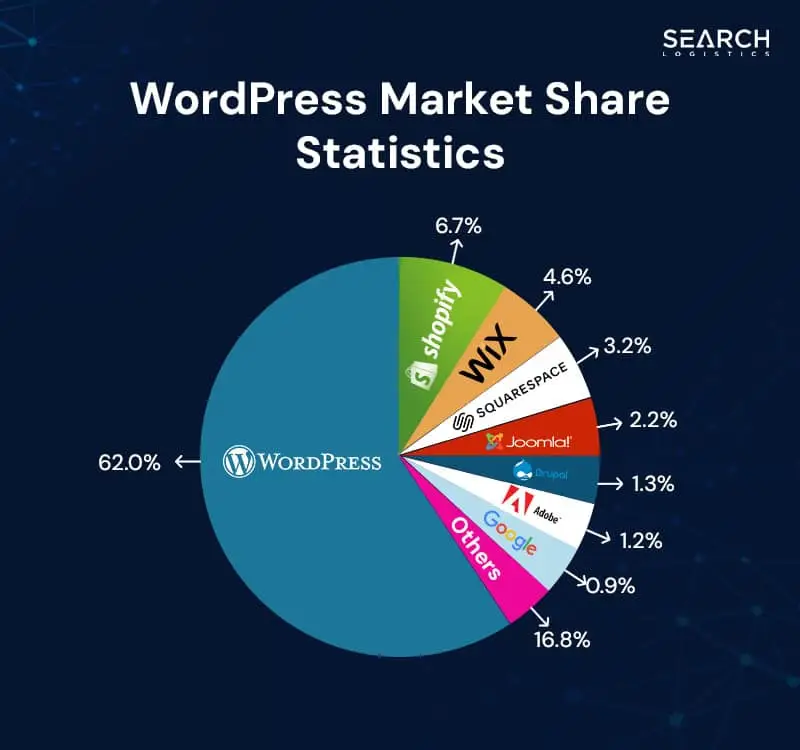
Imagine launching your dream website—a vibrant blog, an online store bursting with potential, or a portfolio that turns heads—only to watch it crawl under traffic or crumble from basic glitches. In 2025, with over 43% of the web powered by WordPress (according to W3Techs), choosing the right hosting is your secret weapon. But here’s the twist: You don’t need fancy VPS or dedicated servers to start strong. A regular shared hosting plan can deliver pro-level performance if you know the ropes. Buckle up as we dive into how to harness WordPress on shared hosting, dodging pitfalls and unlocking speed that rivals the big leagues.
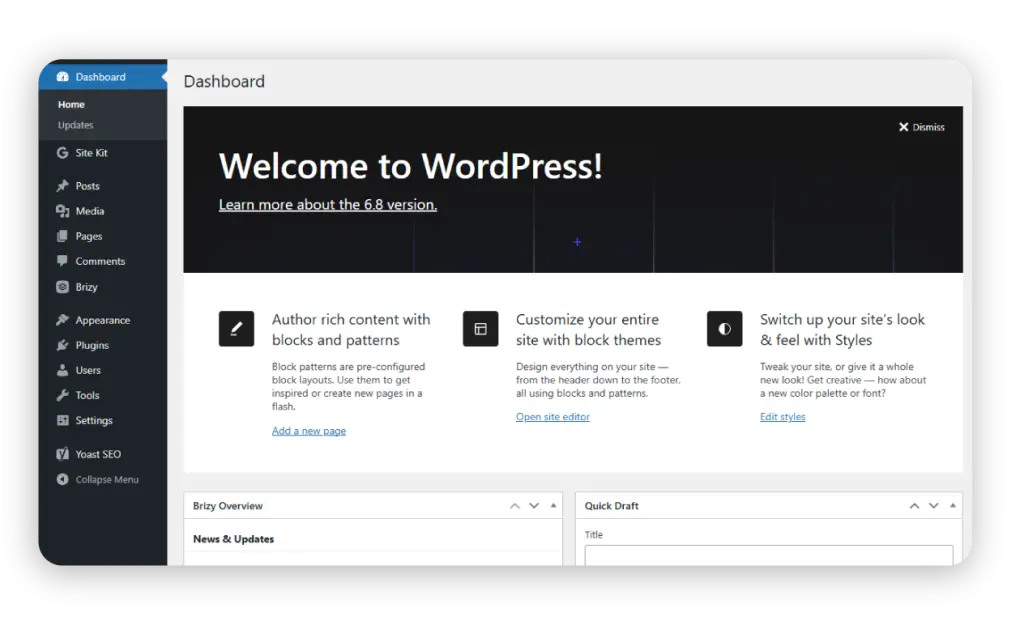
Why bother? Shared hosting keeps costs under $5/month while supporting millions of sites. Yet, missteps like ignoring optimizations can lead to 40% higher bounce rates (Google data). This guide arms you with insider strategies to install, configure, and optimize WordPress on a standard plan—turning budget hosting into a powerhouse.
Decoding WordPress and Shared Hosting: The Perfect Starter Duo
WordPress is the world’s go-to CMS (Content Management System), free, open-source, and endlessly customizable with 60,000+ plugins. It powers everything from personal diaries to Fortune 500 sites. Shared hosting? It’s like renting an apartment in a bustling building: affordable, managed, and resource-shared among tenants. Providers handle server upkeep, making it ideal for beginners.
Pros of this combo:
– Affordability: Entry-level plans fit any budget.
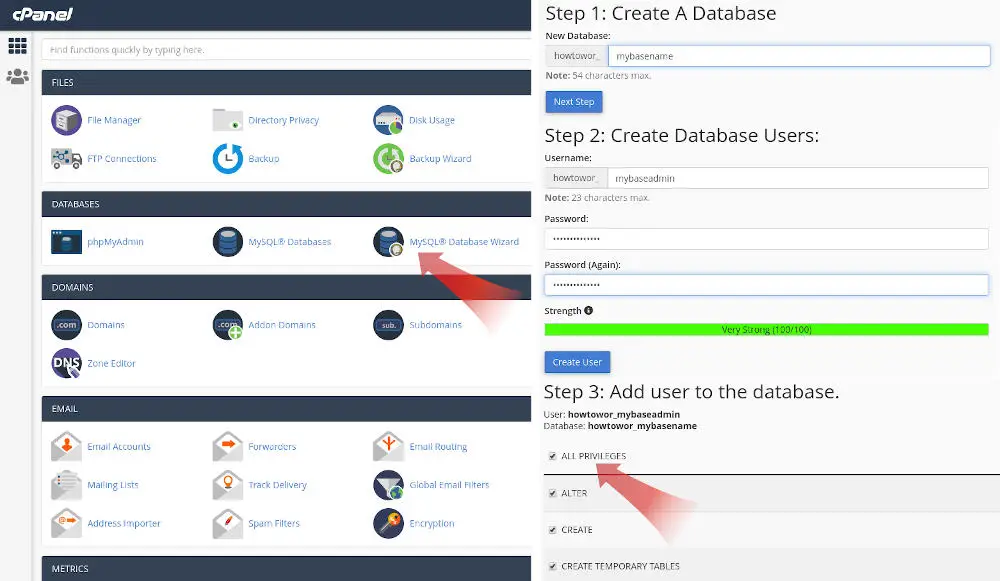
– Ease: One-click installs via cPanel or Softaculous.
– Scalability Start: Handle 1,000-10,000 monthly visitors before upgrading.Cons? Resource limits can cause slowdowns during spikes. But with smart tweaks, you’ll thrive.
Step 1: Choosing the Right Shared Hosting Plan
Not all shared plans are equal. Prioritize:
– Uptime Guarantee: Aim for 99.9%+.- Storage and Bandwidth: Unlimited or generous allocations.
– Free SSL: Essential for security and SEO.
– WordPress Optimization: Built-in caching or staging.
Scan reviews for speed—providers like GoatClouds excel here with SSD storage and global data centers.
Step 2: One-Click Installation Magic
Most hosts simplify setup:
1. Log into your control panel (e.g., cPanel).
2. Find “WordPress” under installers like Softaculous.
3. Enter site details: Name, admin credentials.
4. Hit install—voilà, your site lives!
Manual alternative? Download WordPress from wordpress.org, upload via FTP, create a MySQL database, and run the installer. But why sweat when one-click exists?
Step 3: Configuring for Peak Performance
Post-install, dive into the dashboard:
– Themes: Pick responsive ones like Astra or GeneratePress for mobile-friendliness.
– Plugins: Essentials include Yoast SEO for optimization, WP Super Cache for speed, and UpdraftPlus for backups.
– Security Setup: Install Wordfence or Sucuri to scan for malware. Enable auto-updates.
Tweak wp-config.php for secrets like database keys. Set permalinks to “Post name” for SEO juice.
Step 4: Content Creation and Management
WordPress shines here:
– Posts vs. Pages: Posts for blogs (chronological), pages for static content (e.g., About Us).
– Media Library: Upload images/videos; optimize with plugins like Smush to shrink file sizes.
– Blocks Editor: Gutenberg makes drag-and-drop easy—add headings, galleries, embeds.
Pro tip: Schedule posts for consistent publishing, boosting engagement by 20% (HubSpot stats).
Optimization Hacks for Shared Hosting Limits
Shared plans cap resources, so optimize ruthlessly:
– Caching: Enable browser and server-side caching to serve static files fast.
– Image Compression: Reduce load times by 50% without quality loss.
– Database Cleanup: Use WP-Optimize to purge revisions and spam.
– CDN Integration: Free options like Cloudflare distribute content globally.
– Minify Assets: Plugins like Autoptimize combine CSS/JS files.
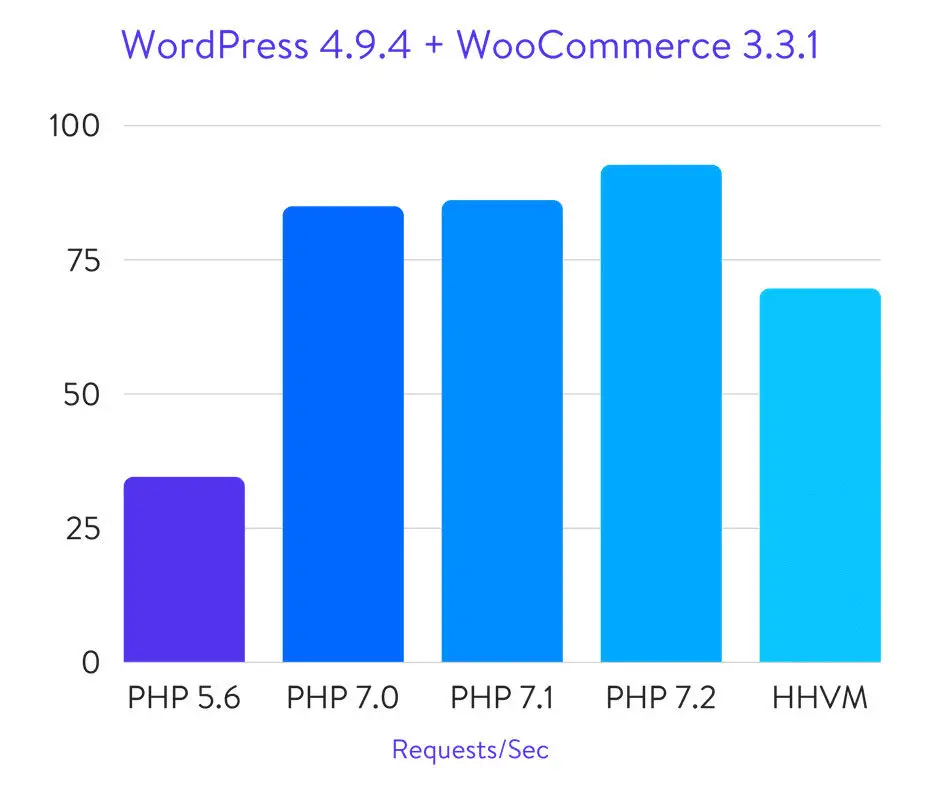
Monitor with Google PageSpeed Insights—aim for 90+ scores.
Troubleshooting Common Pitfalls
Even pros hit snags:
– White Screen of Death: Often plugin conflicts—deactivate via FTP.
– Slow Loads: Check for bloated themes; switch to lightweight ones.
– Resource Exceeds: Upgrade plans or optimize code.
– Hacks: Regular scans and strong passwords prevent 80% of breaches.
Back up weekly—restore points save the day.
Stick with shared until 50,000+ visitors/month. Then, migrate seamlessly.
Advanced Tips:
SEO, Security, and Scaling
– SEO Mastery: Install Yoast; focus on keywords, meta descriptions, and internal links. Mobile optimization ranks higher in Google’s algorithm.
– Security Layers: MFA on logins, hide wp-admin, and monitor logs.
– Monetization: Add WooCommerce for e-commerce—shared handles small stores fine.
– Community Power: Forums like WordPress.org offer free support.
In 2025, AI plugins like Jetpack enhance automation, predicting trends and suggesting content.
Why GoatClouds Makes WordPress on Shared Hosting Effortless
Tired of generic hosts? GoatClouds redefines shared hosting with WordPress-tuned plans: lightning SSDs, free migrations, auto-backups, and 24/7 support. Our one-click installer gets you live in minutes, while built-in security thwarts threats. Thousands trust us for uptime that never quits.
Ready to unleash WordPress without the hassle? Dive into GoatClouds’ shared hosting tailored for creators like you. Explore GoatClouds plans today and watch your site soar.